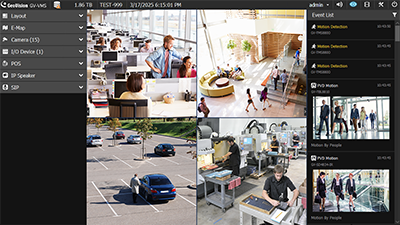
GV-VMS V20
GV-VMS V20 is a feature-rich, AI-powered software solution for professional video surveillance. It integrates AI analytics, flexible monitoring, and seamless integration. Key features include:
Unified Interface
Access live view and playback from a single, streamlined user interface (UI).
Integrated AI Capabilities
-
Built-in facial recognition for local enrollment and matching
-
Integration with AI-powered IP cameras
Advanced Search Tools
-
AI Query and Smart PVD Motion Search for fast and accurate event retrieval
Remote Configuration
-
Set up AI and motion detection features remotely on GV-IP cameras
GV-VMS V20 is a comprehensive video management system that records from both GeoVision and third-party IP devices. Its intuitive drag-and-drop interface allows for easy customization of live view and playback layouts. With built-in video analytics, GV-VMS V20 enhances monitoring capabilities and reduces manual effort. Users can remotely access live views and recordings through GV-Cloud VMS, GV-Edge Recording Manager, the GV-Eye mobile app, or web browsers. It is compatible with GeoVision’s central monitoring systems and third-party ONVIF cameras, providing a versatile surveillance solution.
GV-VMS V20 supports up to 256 IP channels, with up to 64 GV-IP device channels available for free. Additional channels require licenses, and separate licenses are needed for third-party IP devices and UA-HD DVRs. The AI License is required for full AI functionality.

Files & documents for this product
Specifications
| Title | Version | Lang | Size | |
|---|---|---|---|---|
| ▣ Comparison Table for GV-VMS V17, V18, and V20 | — | — | 368KB | ⤓ Download |
Datasheet
| Title | Version | Lang | Size | |
|---|---|---|---|---|
| ▤ Datasheet GV-AI Accelerator Module | — | — | 262.3MB | ⤓ Download |
| ▤ Datasheet GV-VMS V20 | — | — | 669KB | ⤓ Download |
| ▤ Datasheet GV-VMS V20 (French) | — | — | 607KB | ⤓ Download |
| ▤ Datasheet GV-VMS V20 (Portuguese) | — | — | 5.5 MB | ⤓ Download |
| ▤ GV-VMS Feature Guide V20 | — | — | 3.5MB | ⤓ Download |
| ▤ GV-VMS Feature Guide V20 (German) | — | — | 5.1MB | ⤓ Download |
| ▤ GV-VMS Quick Start Guide V20 (German) | — | — | 3.4MB | ⤓ Download |
| ▤ GV-VMS User’s Manual V20 (French) | — | — | 24.2MB | ⤓ Download |
| ▤ How to Modify GV-VMS License | — | — | 1.37MB | ⤓ Download |
| ▤ How to Upgrade GV-VMS to V20 | — | — | 672KB | ⤓ Download |
| ▤ NVR and VMS Comparison Table (French) | — | — | 607KB | ⤓ Download |
| ▤ Version History GV-VMS V20 | — | — | 225KB | ⤓ Download |
Software
| Title | Version | Lang | Size | |
|---|---|---|---|---|
| ◈ GV-AI Accelerator Module Driver | — | — | 3.7MB | ⤓ Download |
| ◈ GV-Authentication Server | — | — | 6.6MB | ⤓ Download |
| ◈ GV-Dynamic DNS Service V2 | — | — | 3.5MB | ⤓ Download |
| ◈ GV-Fast Backup and Restore (Only for GV-VMS V20) | — | — | 11.6MB | ⤓ Download |
| ◈ GV-Fast Backup and Restore (Only for Upgrading GV-VMS to V20) | — | — | 9.9MB | ⤓ Download |
| ◈ GV-IP Device Utility V9.0.7 | V9.0.7 | — | 118MB | ⤓ Download |
| ◈ GV-MultiLang Tool | — | — | 11.4MB | ⤓ Download |
| ◈ GV-POS Text Sender | — | — | 4MB | ⤓ Download |
| ◈ GV-Series Card Driver / GV-USB Device Driver V8.5.7.0 | V8.5.7.0 | — | 5.9MB | ⤓ Download |
| ◈ GV-SetLanguage | — | — | 1MB | ⤓ Download |
| ◈ GV-System Analysis V1.0.0.7 | V1.0.0.7 | — | 1.87MB | ⤓ Download |
| ◈ GV-Video Codec (Only for GV-VMS V20) | — | — | 20.5MB | ⤓ Download |
| ◈ GV-VMS V20 for AI Integration & Free 64 GV-IP CAM Channels (AI License Required) | — | — | 1.66GB | ⤓ Download |
| ◈ TeamViewer V15 | — | — | 41MB | ⤓ Download |
Quick Guide
| Title | Version | Lang | Size | |
|---|---|---|---|---|
| ◧ GV-VMS Quick Start Guide V20 | — | — | 3.8MB | ⤓ Download |
User Manual
| Title | Version | Lang | Size | |
|---|---|---|---|---|
| ▦ GV-VMS User’s Manual V20 | — | — | 22.5MB | ⤓ Download |